

Computer Communication and Network is an important topic in Science and Technology that deals with the exchange of data between computers and devices through wired and wireless networks. It enables communication, data sharing, and connectivity across the world. Under this topic, we will study different types of networks, communication protocols, and their applications in the internet, mobile communication, and modern digital systems.
This post is written for the RAS Prelims examination; click here to read the detailed version for the RAS Mains exam.
Communication Systems
- The exchange of information and data from one computer (Sender) to another computer (Receiver) is known as Data Communication.
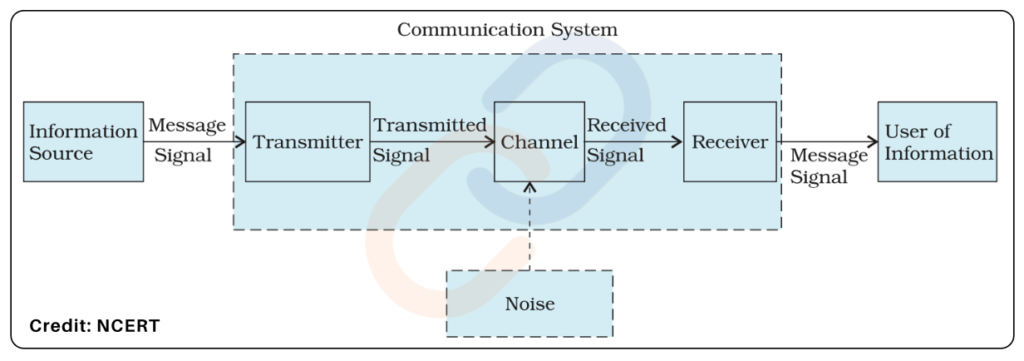
- A communication system is a setup or network that enables the exchange of information (data, voice, video, etc.) between a sender and a receiver using a specific medium and protocol.
Elements of a Communication System
Transmission Media Or Communication Channel
- It is the medium through which the signal travels from the transmitter to the receiver.
- Transmission media are generally divided into two groups:
- Wired Media: Guided Media
- Use physical connections like copper cables, optical fibers, or coaxial cables.
- Example: LAN Ethernet cables.
- Wireless Media: Unguided Media
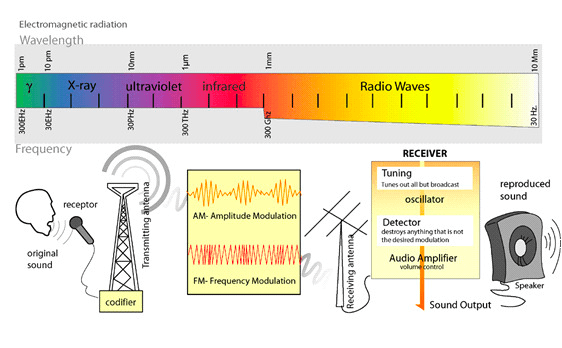
- Use electromagnetic waves (radio, microwave, infrared).
- Example: Satellite Communication, Wi-Fi, Bluetooth, mobile networks
- Wired Media: Guided Media
Wireless Media
| Medium | Frequency | Line of Sight | Range | Advantages | Limitations | Applications |
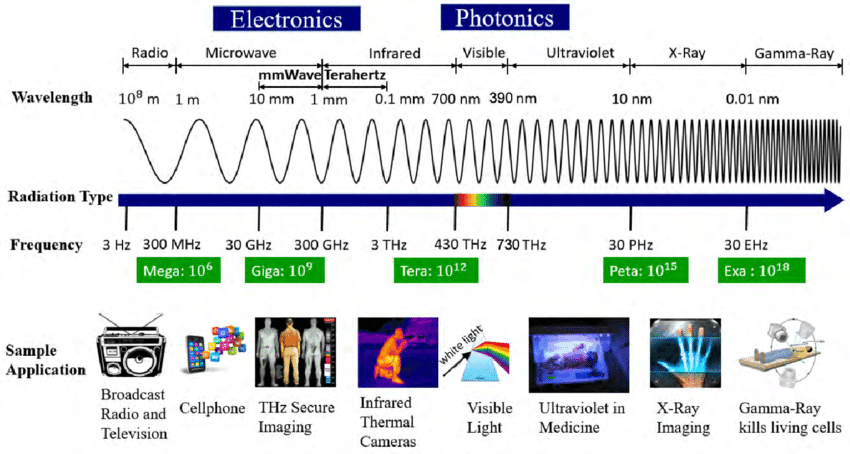
| Radio | 30 Hz-300 GHz (Very High, Ultra High, Super High) | Not needed | Long | Cheap, penetrates walls | Low data rate, interference | AM/FM, telegraphy, basic communication. |
| Microwave | 1-300 GHz (High) | Required | 25 – 30 km | High capacity, cheaper | Needs towers and repeaters, weather issues | Telephony, cellular, TV |
| Satellite | 1-40 GHz | Required | Global | Wide coverage | Costly, delay, weather | GPS, TV, defense, global communication. |
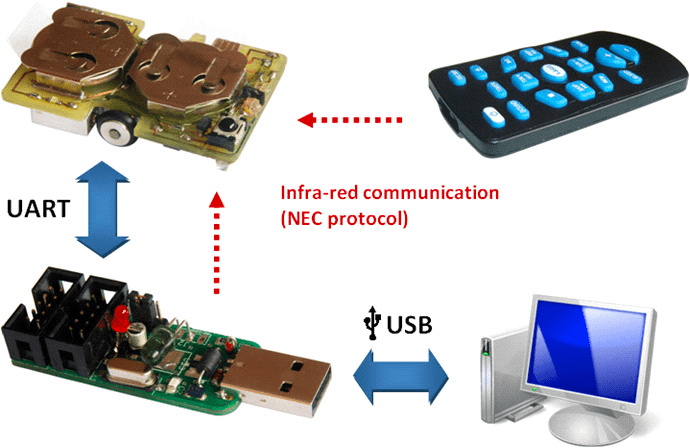
| Infrared | 300 GHz -400 THz (Very High) | Required | Few meters | Fast, cheap, safe | Blocked by obstacles | Remote controls, LAN in a room |
| Wi-Fi | 2.4/5 GHz | Not always | 20–100 m | High-speed, flexible | Limited coverage, interference | WLAN, internet hotspots |
| Bluetooth | 2.4 GHz | Not required | ~10 m | No cables, easy link | Short range, low speed | Headsets, mouse, mobile pairing |
Propagation of Electromagnetic Waves
| Propagation Mode | Frequency Range | Path of Propagation | Key Applications |
| Ground Wave (or Surface Wave) | VLF, LF, MF (up to ≈3 MHz) | Waves travel along the surface of the Earth. | AM (Medium Wave) Broadcasting, Maritime Communication, Navigation. |
| Sky Wave | HF (High Frequency: 3 MHz −30 MHz) | Waves are reflected back to Earth by the Ionosphere. | Shortwave Radio broadcasting for long-distance international communication. |
| Space Wave | VHF, UHF, SHF(Above ≈30 MHz) | Waves travel in a straight line (Line-of- Sight) or are refracted/reflected by the Troposphere. (lower atmosphere). | FM Radio, TV Broadcasting, Mobile Communications (2G/3G/4G/5G), Satellite Communication, Radar, Wi-Fi, GPS. |
Important Wireless Communication Frequency Bands:
- AM Broadcast: 540-1600 kHz
- FM Broadcast: 88-108 MHz
- TV: VHF (54-72 MHz, 76-88 MHz) & UHF (174-216 MHz, 470-890 MHz)
- Commonly used bands for cellular communication are 800 MHz, 900 MHz, 1800 MHz, 2100 MHz, and 2300 MHz.
- Beyond that are the unlicensed bands used for technology such as Wi-Fi and Bluetooth – Wi-Fi used to be 2.4GHz (2400MHz) and has started to shift to the 5GHz band.
- Satellite: 5.925-6.425 GHz (Uplink), 3.7-4.2 GHz (Downlink).
- The International Telecommunication Union (ITU) manages global frequency allocations.
Satellite Communication
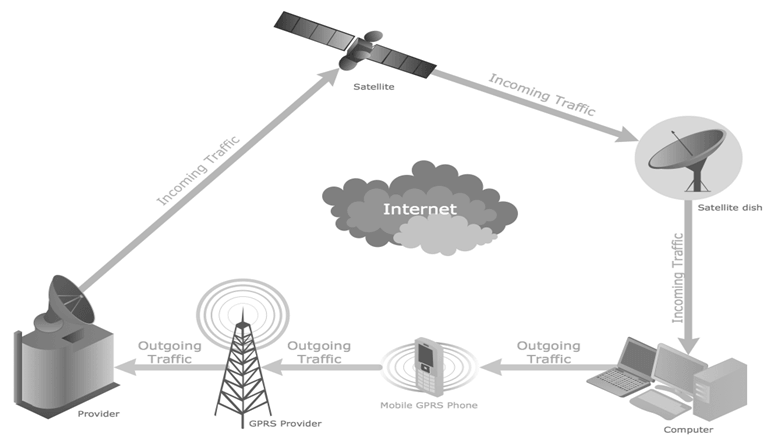
- It is a communication system that uses satellites in space to relay signals between two distant locations on Earth.
- It is used in mobile communication, TV broadcasting, and data transfer.
- Satellite communication typically supports two-way communication, not just one-way.
Working of Satellite Communication
Satellite communication works on the basic principle of radio wave transmission. A communication satellite utilizes three key elements to function:
- Uplink: This is the process where a signal is sent from a ground station to the satellite.
- Downlink: This is the process where the satellite retransmits the received signal back down to a different ground station.
- Transponder: Located on the satellite itself, the transponder is the device responsible for receiving the signal, amplifying it, and then retransmitting it to the ground.
Types of Satellites in Communication: Based on their orbital position
Orbit Type | Details / Characteristics & Examples |
Geostationary Satellites (GEO) |
|
Low Earth Orbit (LEO) |
|
Medium Earth Orbit (MEO) |
|
Frequency Bands in Satellite Communication
- L-Band: Used for mobile communication and GPS.
- C-Band: Traditionally used for satellite TV and data transmission.
- Ku-Band: Used for satellite TV broadcasting and internet services.
- Ka-Band: Higher frequency band, used for high-throughput satellite communications, including broadband internet.
Bluetooth, Wi-Fi and Li-Fi
Bluetooth vs. Wi-Fi (Key Differences)
| Feature | Bluetooth | Wi-Fi |
| Network Type | WPAN (Wireless Personal Area Network) → Device-to-device connectivity (e.g., audio, peripherals). | WLAN (Wireless Local Area Network) → Connecting devices to a network/internet via a router. |
| Frequency Band | Primarily 2.4 GHz. | 2.4 GHz, 5 GHz, 6 GHz. |
| Data Rate (Speed) | Low – Up to 3 Mbps (Bluetooth 5.0). | High – Up to 10 Gbps (Wi-Fi 6/6E). |
| Range | Very Short (≈10 meters). | Medium (≈30−100 meters). |
| Line of Sight | No (Uses radio waves which can pass through objects). | No (Uses radio waves which can pass through objects). |
| Use Cases | Headphones, file sharing, IoT devices. | Internet access, streaming, smart homes. |
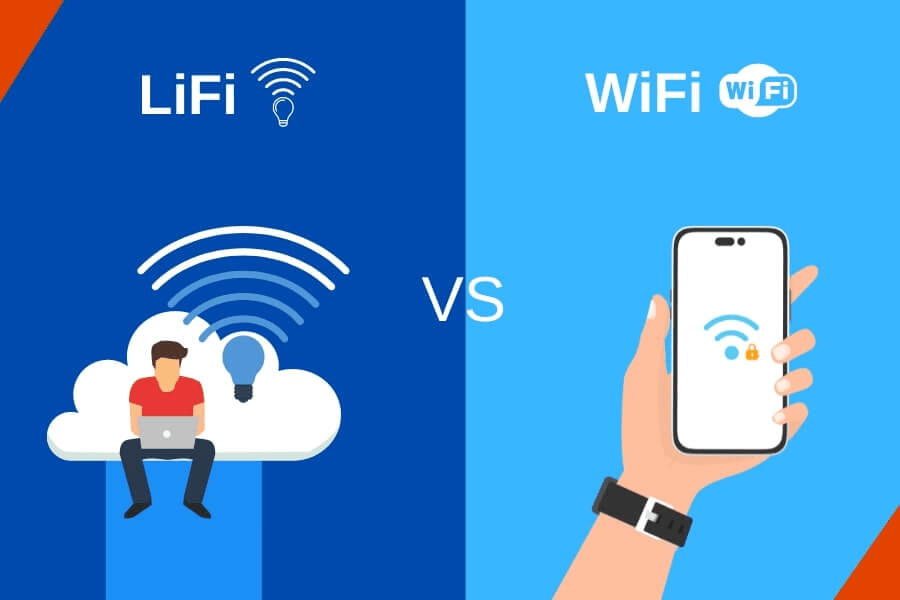
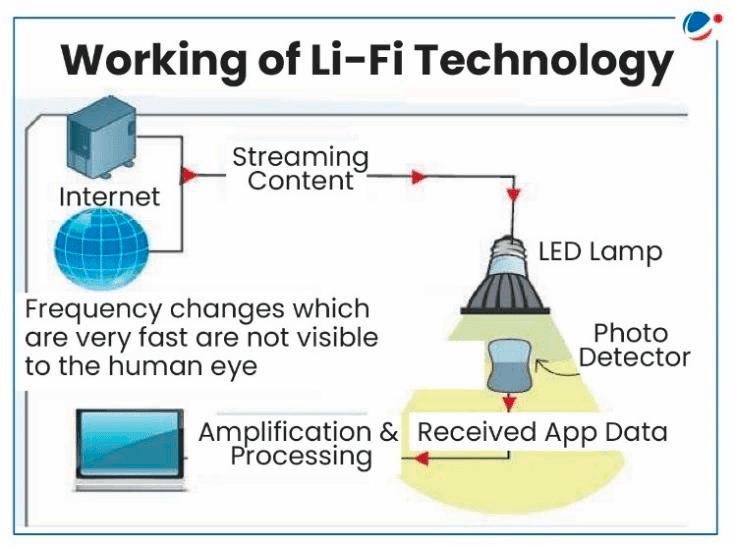
Wi-Fi (Wireless Fidelity) and Li-Fi (Light-Fidelity)Wi-Fi and Li-Fi are two different wireless communication technologies that enable data transmission, i.e., offer a way to connect to the internet without physical cables.
| Parameter | Wi-Fi | Li-Fi |
| Medium | Radio waves (2.4-5 GHz) | Visible or UV light using LED transmitters. Photodetector receives the data |
| Range | 30-100 m | 10 m |
| Speed | Up to 1-10 Gbps | Up to 100 Gbps (theoretical) |
| Direction | Bidirectional | Bidirectional |
| Advantages | Wider range | Faster speed, high security |
| Limitations | Radio frequency interference, latency | Short range, needs direct line-of-sight communication |
Wi-Fi 6.0 (AX Wi-Fi)
- Next-gen standard in Wi-Fi.
- Designed for the IoT world with billions of devices.
- Features
- Optimum performance in dense networks (stadiums, offices).
- Higher security & interoperability.
- Lower latency & lower battery use.
- Increased bandwidth → better performance.
RFID and NFC
Near Field Communication (NFC) Technology
- Definition: Short-range wireless connectivity technology enabling communication between NFC-enabled devices with a single touch.
- Working Principle: Uses electromagnetic radio fields to transmit data; effective range ≤ 4 cm.
- Requirement: Both devices must be NFC-enabled and in close proximity/contact.
- Applications:
- Payments: Contactless banking cards, e-wallet transactions.
- Transport: Contactless public transportation tickets.
- Others: Wireless charging, vending machines, parking meters, NFC-enabled wristbands (e.g., for patient data tracking), inventory & sales monitoring.
- Limitations:
- Very short range
- Low data transfer rate (~few Kbps).
RFID vs NFC
| Parameter | RFID | NFC |
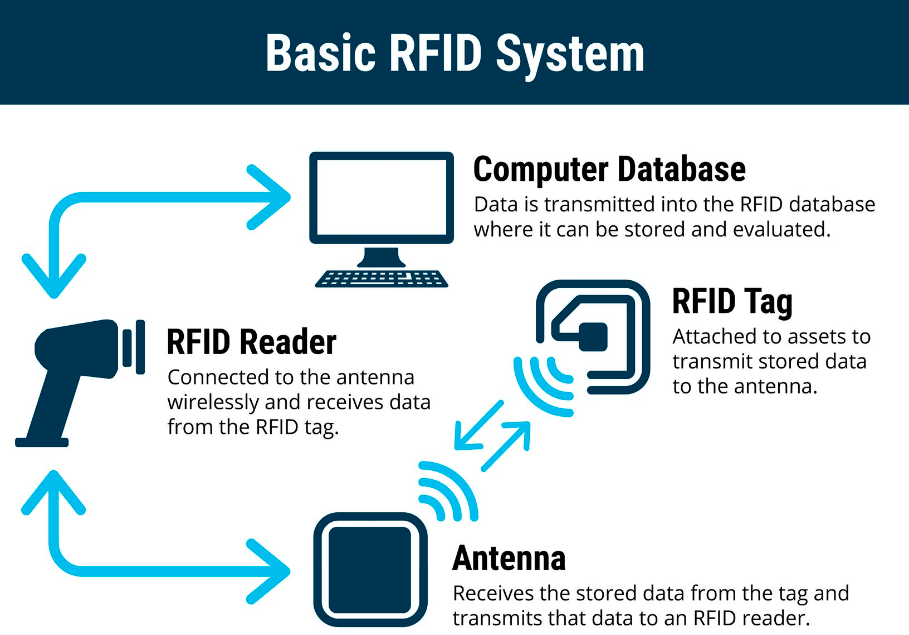
| Full Form | Radio Frequency Identification | Near Field Communication |
| Technology Type | Wireless system with tags + readers | Short-range electromagnetic field communication |
| Range | A few cm → several meters (depends on passive/active tag) | Ultra-short range (~4 cm) |
| Data Transmission Medium | Radio waves | Electromagnetic field (Radio frequency) |
| Speed of Data Transfer | Low–moderate (Kbps–Mbps) | Very low (a few Kbps) |
| Power Requirement | Passive tags: none; Active tags: battery | Both devices need NFC |
| Applications | FASTag, inventory tracking, livestock tracking, access control | Contactless payments, public transport cards, hospital wristbands, vending machines |
| Advantages | No line-of-sight needed, works over meters | Simple, secure, easy touch-to-use |
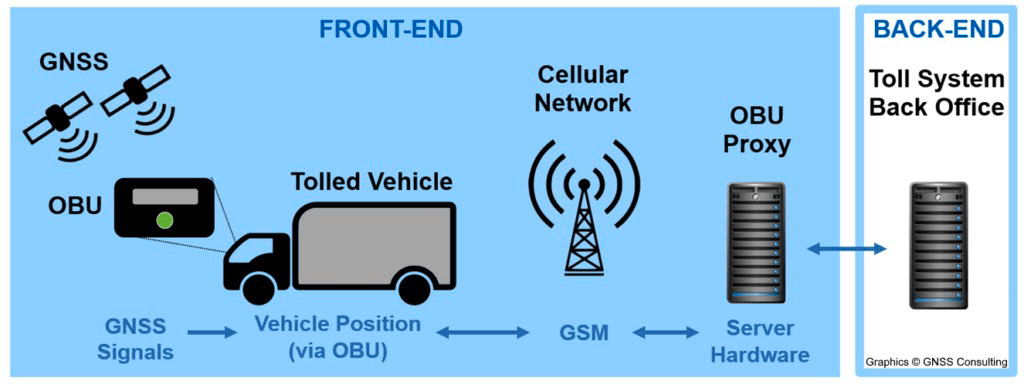
Satellite-based Toll Collection (India, 2024)
- Govt. to replace RFID-FASTag system (2016, mandatory 2021).
- Toll will be collected via GPS/satellite-based system → vehicles charged based on distance travelled, not toll plazas.
Mobile Telephony
Evolution of Mobile Telephony (Generations)
| Gen | Technology | Features & Impact |
| 1G | Analog, FDMA | Basic voice calls, poor quality |
| 2G | GSM/CDMA | Digital voice, SMS, limited data |
| 3G | UMTS/HSPA | Mobile internet, video calling |
| 4G | LTE | High-speed data, HD streaming |
| 5G | New Radio, MIMO, mmWave, beamforming | Ultra-fast speed, low latency, IoT, AI integration |
LTE (Long-Term Evolution – 4G standard)
- All-IP network → removes circuit-switched networks (used in 2G/3G) for voice and data.
- Tech:
- OFDMA (Orthogonal Frequency Division Multiple Access) for downlink
- SC-FDMA (Single Carrier Frequency Division Multiple Access) for uplink.
- MIMO (Multiple Input Multiple Output) antennas for higher throughput.
- Features:
- Speeds → 300 Mbps (downlink), 75 Mbps (uplink).
- Latency <10 ms.
- Voice & data over IP (VoIP).
- Utility: Enables HD streaming, gaming, video conferencing.
5G (Ultra-Connectivity, 2020s)
- Key Features:
- Speed up to 10 Gbps.
- Latency <1 ms.
- 1M devices/km² → IoT ready.
- Network slicing → customized virtual networks.
- Tech Used:
- New Radio (NR) → Sub-6 GHz & mmWave (24–100 GHz) → very high speeds and shorter latency.
- Small cells + Massive MIMO for dense coverage + boost efficiency, reliability & capacity.
- Beamforming: Directs signals to devices → stronger, efficient connectivity.
- OFDM: Efficient spectrum use, reduces interference.
- Dynamic Spectrum Sharing (DSS): Allows 4G & 5G to share same spectrum → smooth transition.
- Advantages:
- Autonomous vehicles, remote surgery, AR/VR.
- Smart cities & industrial automation.
- Examples:
- Devices → iPhone 15 Pro, Galaxy S23 Ultra.
- India → Airtel & Jio rollout (2022).
- Global impact → Healthcare, manufacturing, education.
Spectrum Bands in 5G
- Low-Band Spectrum
- Frequency: <1 GHz (e.g. 700 MHz)
- Speed: Up to ~100 Mbps.
- Pros: Wide coverage; better signal penetration → works well in rural & remote areas.
- Cons: Speeds not sufficient for industrial/mission-critical apps.
- Use Case: Commercial mobile users (basic connectivity).
- Mid-Band Spectrum
- Frequency: 1–6 GHz (e.g. 3.3–3.6 GHz) (Sub-6 GHz).
- Speed: Faster than low band, but lower than mmWave.
- Pros: Balance of speed & coverage → Considered “sweet spot”.
- Cons: Limited coverage, moderate penetration.
- Use: Enterprises, factories, specialized networks (IoT, industry 4.0) → private 5G networks.
- High-Band Spectrum
- Frequency: >24 GHz (e.g. 26 GHz)
- Speed: Up to 20 Gbps (vs ~1 Gbps in 4G).
- Latency: Very low (<1 ms)
- Pros: Ultra-fast speeds, very low latency.
- Cons: Poor penetration, very limited coverage; affected by obstacles
- Best suited for: Dense urban zones, stadiums, smart cities, autonomous vehicles, AR/VR.
- Millimeter Wave (mmWave) Band
- Part of high-band spectrum (24–100 GHz).
- Short wavelength → very high speed + very low latency.
- Optimizes data transport efficiency.
- Key enabler for ultra-reliable 5G experience.
Spectrum Allocation in India
- Auctioned by: Department of Telecommunications (DoT)
- Latest Auction: July 2022 (₹1.5 lakh crore bids)
- Bands Sold: 700 MHz, 3.5 GHz, 26 GHz
- Major Buyers: Reliance Jio, Bharti Airtel, Vodafone Idea.
- Rollout Obligations: TSPs must install BTSs (Base Transceiver Stations) in a phased manner.
- Coverage: 99.6% of districts now have 5G coverage.
6G (Future – 2030s)
- Expected: Speeds up to 1 Tbps.
- Spectrum: Below 6 GHz bands, mmWave, Terahertz (future).
- Features: AI-driven networks,holographic communication, human-machine interfaces, space-based internet.
- India – Bharat 6G Vision (2023):
- Goal → India to lead in 6G by 2030.
- Bharat 6G Alliance (B6GA) → industry, academia, global partners.
- Patent target → 10% global share by 2030.
- Technology Innovation Group on 6G (TIG‑6G): Department of Telecommunications (DoT).
- Challenges: Infrastructure, funding, R&D.
- ‘Bharat 6G 2025’ – 3rd International Conference & Exhibition
- Venue: May 2025: Hotel Le‑Meridien, New Delhi.
- Organiser: Bharat Exhibitions, supported by DoT, global industry bodies (ETSI, BIF, etc.).
Free Space Optical (FSO) Communication
- FSO Communication → Transmission of optical signals (light/laser beams) through free space (air, atmosphere, vacuum) using line-of-sight (LOS) between transceivers.
- Used for short-range, high-speed communication links (e.g., between buildings, satellite-to-satellite).
- Advantages
- Ultra-High Data Rates → Tens to hundreds of Gbps (supports HDTV, broadband).
- Flexibility → Easier & cheaper deployment than optical fiber (no digging, cabling).
- Scalable Architecture → Supports multiple topologies:
- Point-to-Point
- Point-to-Multipoint
- Multipoint-to-Multipoint
- Secure → Narrow laser beam → harder to intercept.
- License-free spectrum (unlike radio/microwave).
- Limitations
- Atmospheric Interference → Fog, rain, dust, turbulence degrade signals.
- LOS Requirement → Needs clear, unobstructed path.
- Limited Distance → Works best over short to medium ranges (< few km).
- Weather-dependent Reliability → High attenuation in adverse conditions.
Deep Space Optical Communication (DSOC)
- NASA’s first optical communication test beyond the Earth-Moon system.
- Uses near-infrared light to transmit data, instead of traditional radio waves.
- Key Features
- 10× faster than radio frequency communication.
- Enables high-data-rate transfer → HD images, video streaming, larger scientific datasets.
- Demonstration: From NASA’s Psyche spacecraft (2023).
- Sent 15-sec UHD video from 31 million km.
- Achieved 267 Mbps data rate.
- Significance
- Paves way for deep space exploration with high-bandwidth communications.
- Critical for future crewed Mars missions, real-time data transfer, and space science expansion.
Space Internet Projects
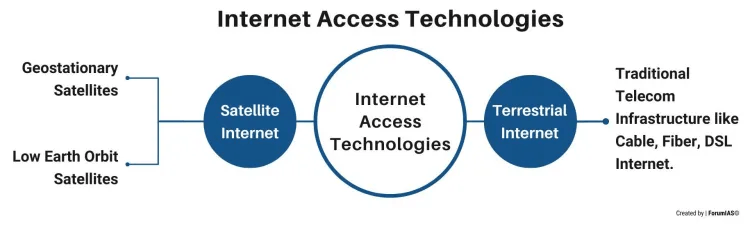
Project Name | Description / Objective |
Starlink Project |
|
Five to 50 service |
|
Project Kuiper |
|
Loon Project |
|
Bluewalker 3 Satellite
- A prototype satellite, a part of a planned constellation of over a hundred similar satellites intended to deliver mobile or broadband services anywhere in the world.
- Launched by a US-based company. The largest commercial antenna system ever deployed in low-Earth orbit.
- The satellite is among the brightest objects in the night sky resulting from a massive phased-array antenna.
Communication Network
- Computer networks vary in size, range, and purpose. They can range from personal devices connected via Bluetooth within a single room to global networks interconnecting millions of devices.
- Networks are classified based on their geographical area and data transfer rates into four broad categories:
- Personal Area Network (PAN)
- Local Area Network (LAN)
- Metropolitan Area Network (MAN)
- Wide Area Network (WAN).
Types of Computer Networks
| Feature | PAN | LAN | MAN | WAN |
| Full Form | Personal Area Network | Local Area Network | Metropolitan Area Network | Wide Area Network |
| Coverage Area | ~10-100 m | Building / Campus (≤ 1 km) | City / Metro region | Country / Continent |
| Purpose | Connect personal devices | Connect devices in a limited area | Connect multiple LANs in a city | Connect LANs & MANs globally |
| Speed | Low (1–100 Mbps) | High (100 Mbps–10 Gbps) | Moderate | Very high to very low |
| Connection Media | Bluetooth, NFC, USB | Ethernet, Wi-Fi | Fiber, Microwave (Wi-MAX – Internet in a city) | Fiber, Satellite, Cellular |
| Ownership | Individual | Private (Home/Office) | Govt / Large orgs | Public / Private |
| Examples | Bluetooth headset | Home/Office Wi-Fi | City Wi-Fi network | Internet |
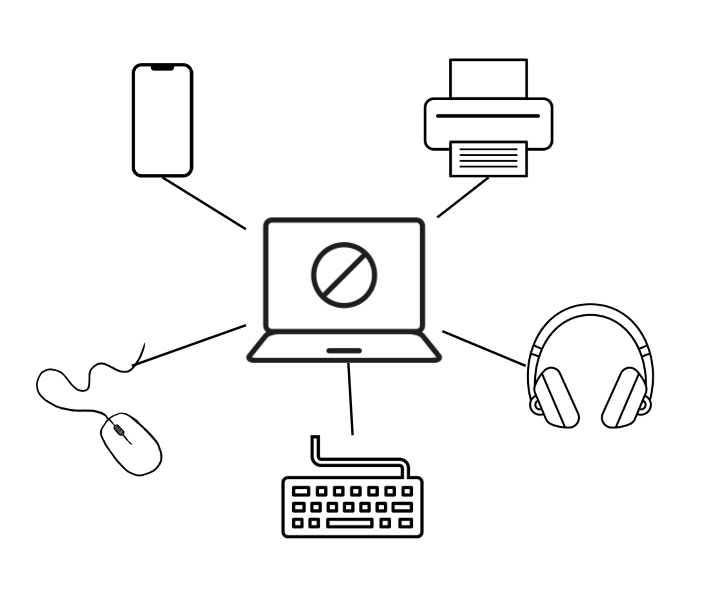
Fig: PAN
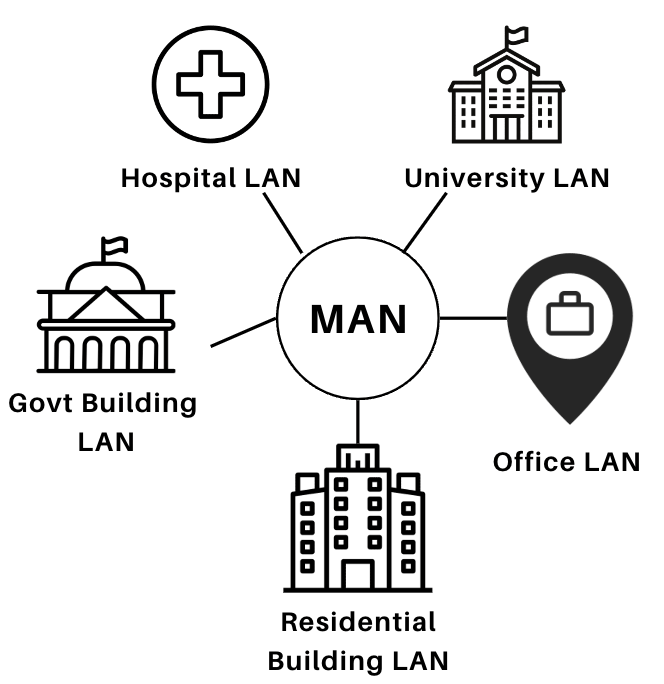
Fig: MAN
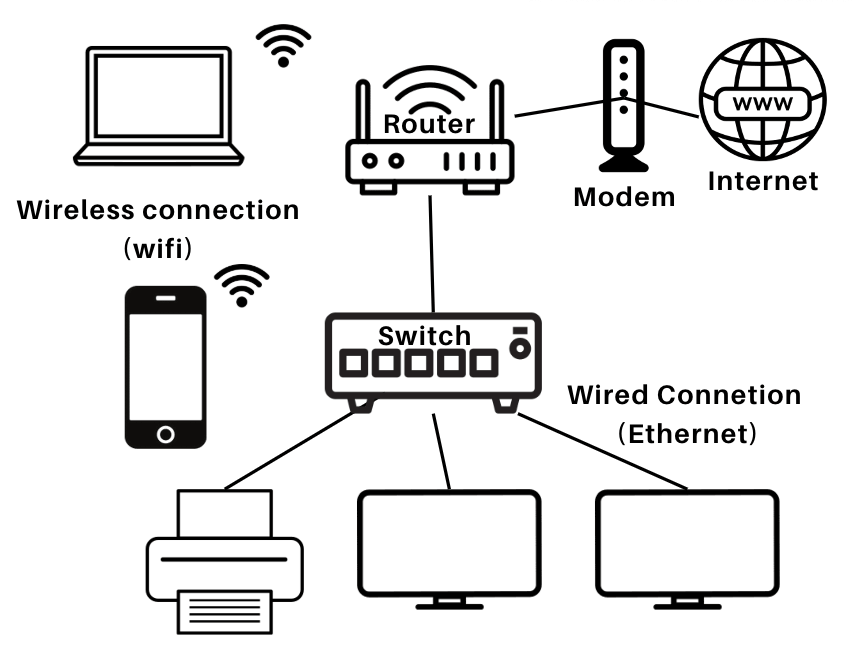
Fig: LAN
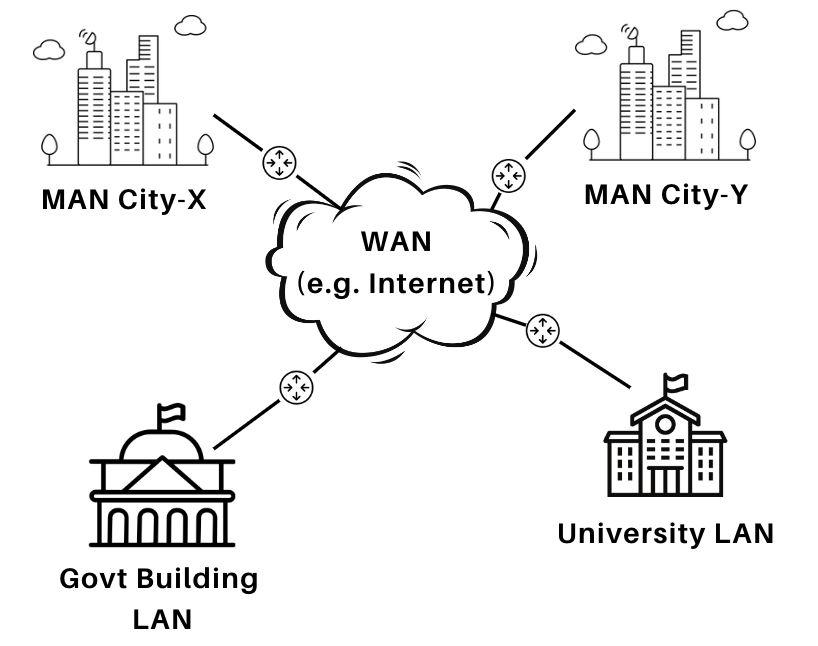
Fig: WAN
World Wide Web and Internet
World Wide Web (WWW)
- Introduced: 13 March 1989 by Tim Berners-Lee.
- A system of Internet servers supporting hypertext & multimedia.
- Enables exchange of information between computers.
Web Page
- Basic unit of WWW, created using HTML.
- Types:
- Static (fixed content)
- Dynamic (changes with user interaction/database).
- Home Page → First/main page of a website.
Website
- Collection of related web pages under one domain.
- Example:
- www.carwale.com → Website
- www.carwale.com/new/ → Web page
Web Browser
- Software to access, retrieve, and display web content.
- Types:
- Text Browser → Only text (e.g., Lynx).
- Graphical Browser → Text + graphics (e.g., Google Chrome, Safari, Opera, Mozilla Fire Fox, MS internet explorer, Netscape Navigator).
- First graphical browser → NCSA Mosaic.
Web Server
- Stores & delivers web pages to browsers.
- Identified by unique IP address.
- Examples: Apache HTTP Server, IIS, Lighttpd.
Web Address / URL (Uniform Resource Locator)
- Identifies location of a webpage.
- Structure:
- http:// → Protocol
- www → World Wide Web
- google.com → Domain name
- /services/ → Directory
- index.htm → Web page
- First URL created in 1991 by Tim Berners-Lee.
Domain Names
- Unique identifiers of websites.
- Examples: google.com, yahoo.com
DNS (Domain Name System)
- Translates domain names ↔ IP addresses.
- Also manages mail exchange servers.
Search Engines
- Tools to find information on WWW.
- Examples: Google, Microsoft Bing, Yahoo, AltaVista, Lycos, Excite, WebCrawler.
- Hit → Relevant result, Miss → No result found.

Interconnecting Protocols
- Protocol → Set of rules governing data communication (what, how, and when data is communicated).
Major Protocols Used in Internet Communication
- TCP/IP (Transmission Control Protocol/Internet Protocol)
- TCP → Provides reliable transport, breaks messages into packets (source) → reassembles at destination.
- IP → Provides addressing & routing of packets across networks.
- Each IP packet contains source & destination addresses.
- IPv4 → 32-bit; IPv6 → 128-bit.
- FTP (File Transfer Protocol)
- Transfers files between computers with Internet connectivity.
- Works across different operating systems.
- Examples: FileZilla, gFTP, Konqueror.
- HTTP (HyperText Transfer Protocol)
- Defines format & transmission of web messages.
- Governs browser-server communication.
- Works with HTML (HyperText Markup Language) → markup tags (<>) tell browser how to display content.
- Telnet Protocol
- Remote login protocol → allows user to connect to servers on LAN/Internet.
- Requires valid username & password.
- Used for remote administration.
- Usenet Protocol
- Internet-based group communication system.
- Users exchange views & information on topics of interest.
- No central server; relies on newsgroups.
- PPP (Point-to-Point Protocol)
- Provides direct dial-up Internet connection using a modem.
- Transmits data at ~9600 bps (old tech).
- Replaced largely by broadband & wireless.
- SMTP (Simple Mail Transfer Protocol)
- Standard E-mail protocol on TCP/IP networks.
- Enables sending emails.
- WAP (Wireless Application Protocol)
- Designed for mobile devices with limited display & bandwidth.
- WAP browsers used in early cell phones (pre-smartphone era).
- VoIP (Voice over Internet Protocol)
- Transmits voice communication over IP networks.
- Example → Internet calls (Skype, WhatsApp calling).
File Formats in Computers
Audio Formats
| Format | Description | Use Case |
| MP3 | Compressed, lossy format | Music, podcasts |
| WAV | Uncompressed, high-quality | Professional audio editing |
| AAC | Advanced compression, better than MP3 | Apple devices, streaming |
| FLAC | Lossless compression | Audiophile music storage |
| OGG | Open-source, compressed format | Games, open platforms |
| MIDI | Musical instrument data (not sound) | Digital music production |
Video Formats
| Format | Description | Use Case |
| MP4 | Most common, compressed format | Streaming, mobile, web |
| AVI | Uncompressed or lightly compressed | High-quality video storage |
| MKV | Supports multiple audio/subtitle tracks | Movies, open-source platforms |
| MOV | Apple’s video format | Mac/iOS editing |
| WMV | Windows Media Video | Windows-based playback |
| FLV | Flash video format (now obsolete) | Legacy web video |
| WebM | Open-source format for web | HTML5 video |
Text Formats
| Format | Description | Use Case |
| TXT | Plain text, no formatting | Notes, logs |
| DOC/DOCX | Microsoft Word format | Documents, reports |
| Portable Document Format (fixed layout) | E-books, forms, official files | |
| RTF | Rich Text Format | Basic formatting, cross-platform |
| HTML | Web page markup | Websites, browsers |
| XML | Structured data format | Data exchange, configuration |
| Markdown (.md) | Lightweight markup for docs | GitHub, documentation |
Types of Image Files
- JPEG (or JPG) – Joint Photographic Experts Group.
- PNG – Portable Network Graphics.
- GIF – Graphics Interchange Format.
- TIFF – Tagged Image File Format.
- PSD – Photoshop Document.
- PDF – Portable Document Format.
- EPS – Encapsulated PostScript.
- AI – Adobe Illustrator Document.
- SVG – Scalable Vector Graphic.



